SuperIntern API and MCP: Let Your Own AI Tools Work From the Same Company Brain
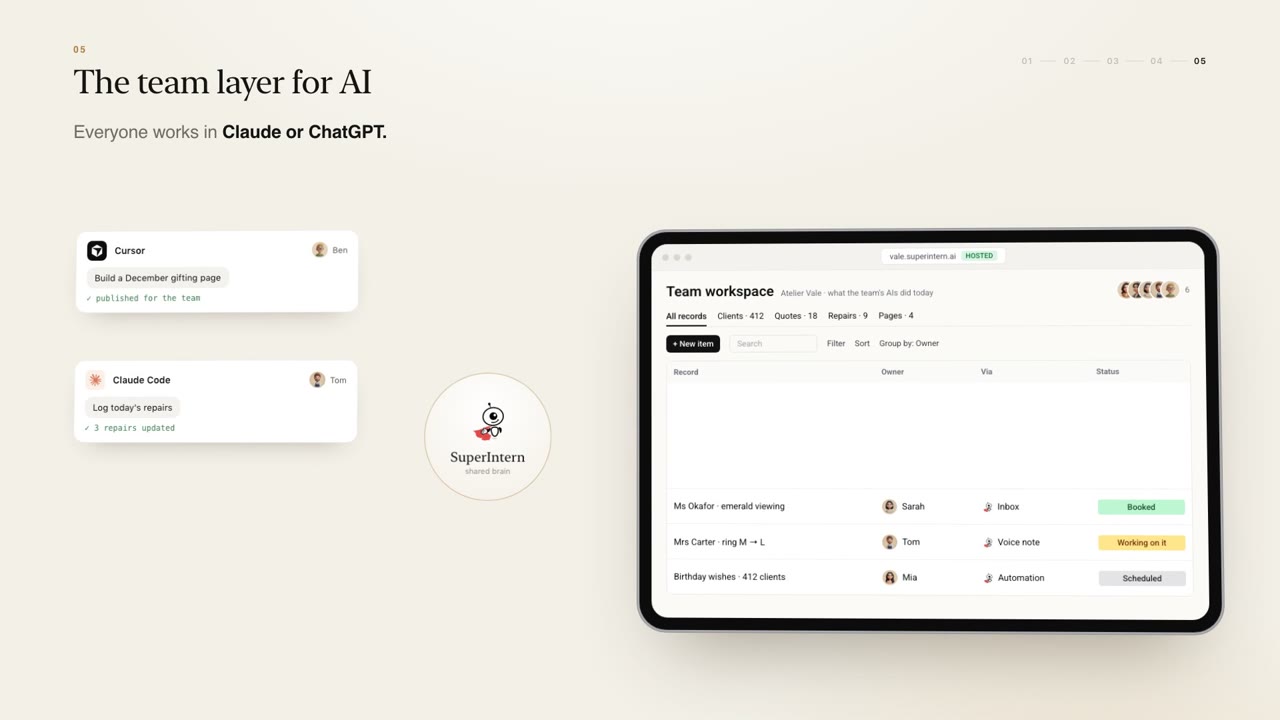
With the SuperIntern API and MCP, ChatGPT, Claude, Claude Code, Cursor and your own systems read and write the same company brain: CRM, inbox, tasks and reports.
The SuperIntern API and MCP let the AI tools your team already likes, such as ChatGPT, Claude, Claude Code and Cursor, read and write the same company brain as your SuperIntern assistants. Your CRM, inbox, tasks and reports become shared ground, so work done in any of those tools lands in the team's records instead of disappearing into one person's chat history.
Most teams now use more than one AI tool, and each person has their favourite. That is fine until the useful work done in one of them never reaches anyone else. This article explains how SuperIntern's API and MCP connect those tools to a single shared memory, and what that means for the team.
Everyone keeps their own AI
There is no need to make the whole team switch tools. One person drafts in ChatGPT, another thinks through problems in Claude, a developer builds in Claude Code or Cursor. SuperIntern's position is simple: everyone keeps their own AI.
What changes is where the work goes. Instead of each tool holding its own private context, they all connect to the same company brain, the shared records, knowledge and history that every SuperIntern assistant already uses. You can see this on the home page in the team layer section.
What the API and MCP connect to
Through the API, and through MCP for tools that support it, your AI tools and your own systems can read and write:
- The CRM: clients, contacts and their history
- The inbox: the conversations your team and the Sales Concierge handle
- Tasks: who is doing what and what is due
- Reports: the same view of the business the owner gets each day
Because these are the same records your assistants use, a change made from one tool is visible to the rest of the team, subject to their role.
Work lands in shared records
The practical difference is easiest to see in an example. Sarah prepares for a client meeting by asking her preferred AI tool to pull the client's history from the company brain. During the meeting she agrees a next step. Afterwards, she asks the same tool to log the decision and create a task for a colleague. Both land in the shared records. Her colleague's personal assistant picks up the task, and the owner sees it in the next report.
No one copied and pasted anything between apps. The tool Sarah likes did the work; the company brain kept it.
Pages and tools hosted on your own domain
Teams increasingly build small things with AI: an internal page, a calculator for quotes, a simple dashboard. Usually these end up on one person's laptop or in a link nobody can find again.
With SuperIntern, pages and tools the team builds are hosted on the team's own SuperIntern domain and visible to everyone. If a developer builds a tool in Cursor that reads from the CRM, the rest of the team can open it and use it, and it stays connected to the same shared data.

Connecting your own systems
The same API and MCP access is available to your own systems. If your business has software of its own, it can read from and write to the company brain too, so records do not need to be kept in two places.
This also sits well with DIY pipelines, where anyone on the team can describe an automation in a message and SuperIntern builds it on top of the CRM. Pipelines, assistants and your own tools all work from one memory.
Security and permissions
Opening the company brain to more tools only works if access is controlled. SuperIntern answers are permissioned by role, so what a person can see through their own AI tool follows the same rules as everywhere else. Assistants draft, people decide. Your customer data never trains anyone else's model.
SuperIntern is SOC 2 Type I, GDPR compliant, hosted on Google Cloud and CASA assessed. It is built by a team from Google, Meta, DeepMind, Morgan Stanley and Bank of America, and backed by Samsung Next, Openspace Ventures, Amber Group and Dispersion Capital.
How you get started
Each SuperIntern is built around your business by the SuperIntern team, then hosted and improved for you. It starts with a free 30-minute consultation with the founding team, followed by a pilot on one real workflow with your team for about two weeks, then roll-out to the whole team. There is no price list: pricing is agreed after the pilot and tied to your team and the value delivered.
FAQ
Q: What does the SuperIntern API and MCP do? A: It lets ChatGPT, Claude, Claude Code, Cursor and your own systems read and write the same company brain as your SuperIntern assistants, including the CRM, inbox, tasks and reports.
Q: Does my team have to stop using the AI tools they like? A: No. Everyone keeps their own AI. The difference is that their work lands in shared records the whole team can see.
Q: Where do pages and tools built by the team live? A: They are hosted on the team's own SuperIntern domain and are visible to everyone on the team.
Q: Can our own software connect too? A: Yes. Your own systems can connect through the API and MCP and work from the same shared records.
Q: Who can see what through these connections? A: Answers are permissioned by role, so access through any tool follows the same rules as the rest of SuperIntern.
See it on your business
If your team already works with several AI tools, the quickest win is usually connecting them to one shared memory. Browse examples on our use cases page, or book a free 30-minute consultation.