What is an AI skill?
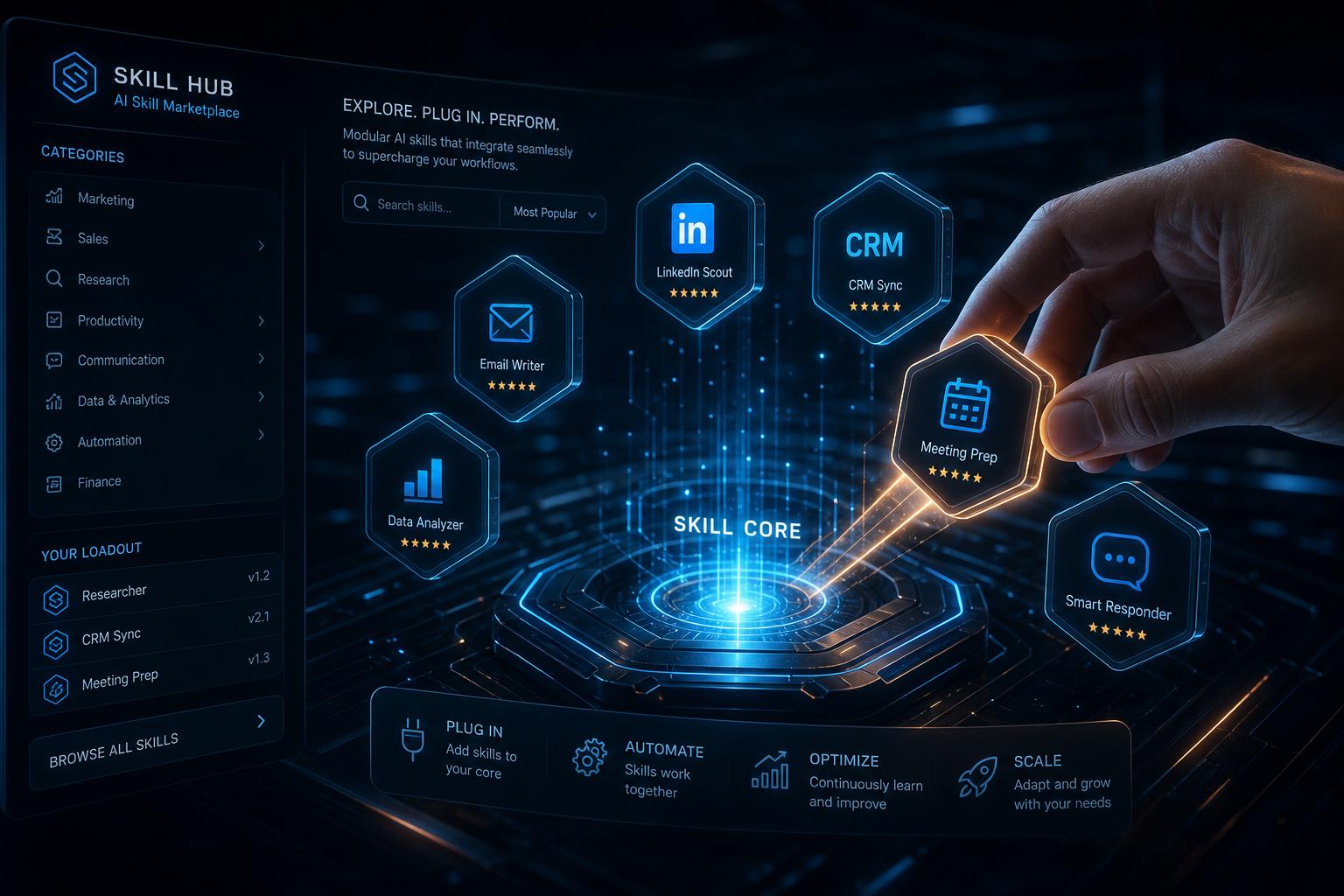
AI skills are modular, installable capabilities that turn your assistant into a domain specialist. Learn how the installable architecture eliminates prompting and scales your business operations instantly.
Imagine you've just hired a general intern. On their first day, they're eager but need a lot of hand-holding. To get them to handle your LinkedIn, you have to write out a three-page manual on your brand voice. To get them to manage your CRM, you have to walk them through every field and trigger.
In the world of AI, this manual hand-holding is called prompting. It’s the "hidden tax" of generic AI assistants. You spend so much time explaining how to do the work that you might as well have done it yourself.
This is why we built AI Skills.
An AI skill is a modular, specialized capability that you "install" into your assistant. Instead of writing a prompt every time, you plug in a specialist who already knows the rules, the tools, and the goal.
The End of the "Prompt Engineering" Era
For a founder or a Corporation of One, efficiency is everything. You don't have time to become a prompt engineer. You need an assistant that just knows how to execute.
Installable skills turn your AI from a generalist into a multi-disciplinary team. Because each skill is a self-contained module, you can expand your intern's utility instantly without adding complexity to every other task.
If you install a LinkedIn skill, your intern gains the ability to draft, schedule, and post in your voice. It doesn't "bloat" the intern's brain; it simply adds a new tool to its belt that it reaches for only when needed.
How SuperIntern kills the operational tax with proactive execution.
How Installable Skills Work
The magic of installable skills lies in their modular architecture. Think of it like the App Store, but instead of apps you have to open and operate, you're installing abilities your assistant can use autonomously.
1. Discovery in the Skill Hub
The Skill Hub is where you find pre-vetted, production-grade abilities. From official skills like Gmail Official and Notion Official to specialized community-built modules for deep research or social media management, you browse and install with one click.
2. Zero-Configuration Onboarding
Once installed, a skill is part of your intern immediately. There is no code to write and no complex "if-this-then-that" logic to build. The skill comes pre-packaged with the instructions and tool access it needs to succeed.
3. Intelligent Routing
You don't need to tell your intern which skill to use. If you say, "Research the latest trends in renewable energy and save it to Notion," your intern automatically routes the request to your Research skill and your Notion skill. It acts as the orchestrator, using the right specialists for each part of the job.
Why Modular is Better Than General
Traditional AI assistants try to be everything to everyone at all times. This leads to "hallucinations" and generic, unhelpful outputs. By using a modular skill system, SuperIntern provides:
- Predictability: A LinkedIn skill has one job—social media. It won't get distracted by your calendar data.
- Precision: Skills follow strict domain-specific rules (e.g., "Always lead with a hook," or "Always cite sources with dates").
- Scalability: You can have up to 20 skills installed at once, allowing your assistant to grow alongside your business.
SuperIntern vs Motion: Why proactive operations beats simple scheduling.
Expert Take: The Product Perspective
We asked Jessica Yang, Product Lead at SuperIntern, about the vision behind the installable skill architecture.
[Placeholder for Jessica Yang's expert insights on how modular skills empower non-technical founders to build custom automated workforces.]
FAQ
Q: Can I create my own skills? A: Yes. Through the Creator Center, you can build custom skills in a no-code editor. You define the name, the rules it follows, and the tools it can use, then install it to your intern.
Q: Do I have to pay for each skill? A: Official skills are included in your SuperIntern plan. Some community-created skills in the Skill Hub may have their own pricing set by the creator.
Q: How many skills can I use at once? A: You can have up to 20 skills installed simultaneously. You can manage, update, or uninstall them at any time from your dashboard.
Q: Is my data shared between skills? A: Skills only access the specific tools and data you grant them. A LinkedIn skill can't see your Gmail unless you've explicitly connected both and the workflow requires it.
Build Your Custom Workforce
The era of the "one-size-fits-all" chatbot is over. By leveraging installable skills, you can build a custom, high-performing workforce that lives inside your messaging app and scales with your ambition.
Ready to specialize your intern? Explore the Skill Hub today.