Meeting Notes Without a Separate App
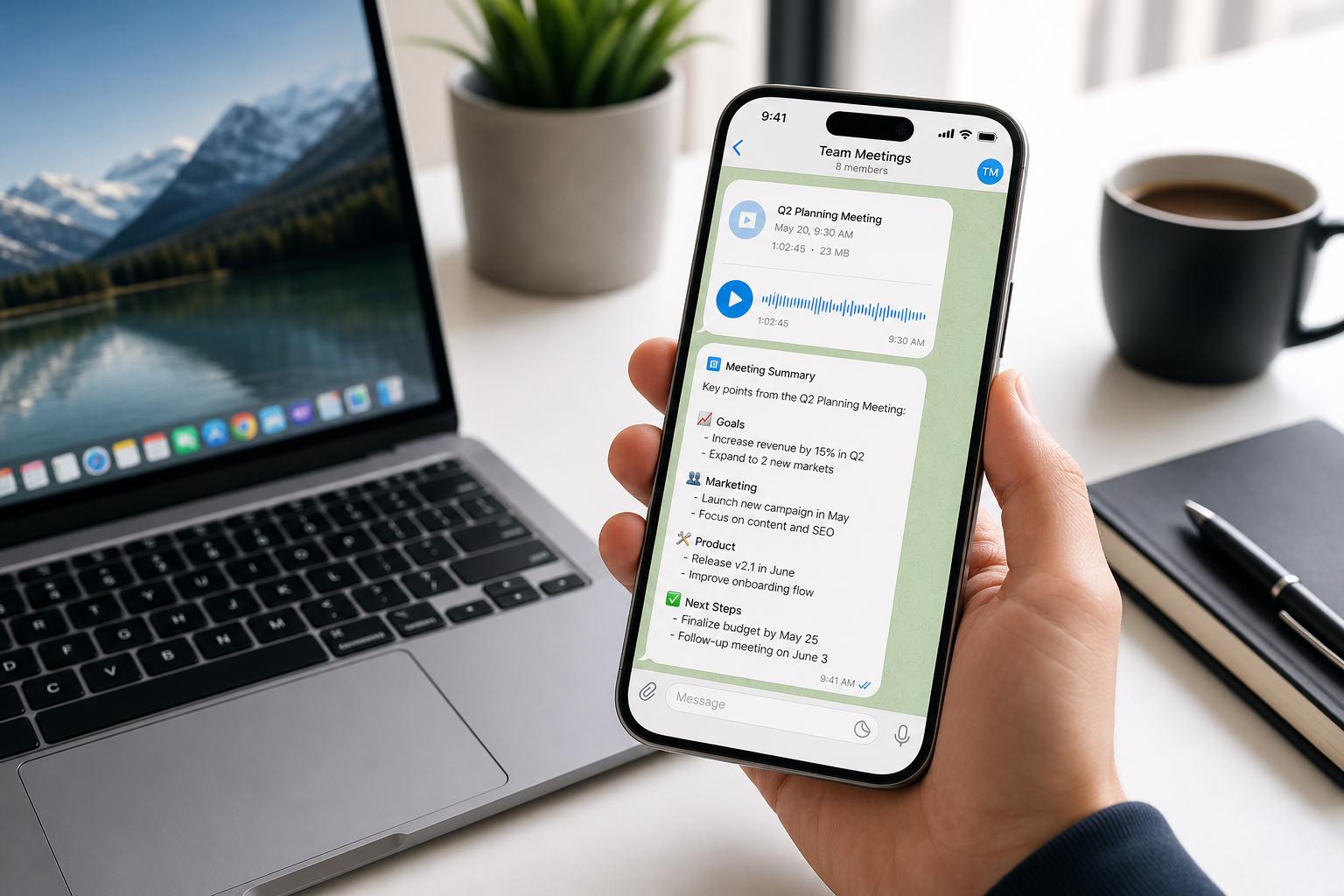
Stop adding more tools to your stack. Learn how to capture, summarize, and distribute meeting notes directly through WhatsApp or Telegram—no new apps required.
The "productivity tax" is real. To take meeting notes today, most founders and operators are told they need a dedicated app—a "bot" that joins their calls, a separate login to manage, and a new dashboard to check. But every new app added to your stack is a new point of friction.
What if the best way to take meeting notes wasn't a new app at all? What if it was the messaging app you already use every day?
The Hidden Cost of "One More App"
We are currently living in an era of App Fatigue. For every simple task—scheduling, bookkeeping, or taking notes—there is a specialized SaaS tool claiming to be the solution. But for a "Corporation of One," this fragmentation creates three major problems:
- The Context Switching Tax: Every time you leave your workflow (Slack, WhatsApp, or Telegram) to open a dedicated note-taking app, you lose momentum. Searching for a specific insight across four different platforms is the opposite of productivity.
- The "Creepy" Bot Factor: Most AI notetakers (like Otter or Fireflies) require an AI bot to join your Zoom or Google Meet. This often requires permission, creates awkward introductions, and can even stifle honest conversation in sensitive meetings.
- The Distribution Gap: After an app takes your notes, you still have to manually copy, paste, and share them with your team or move them into your CRM. The "loop" isn't closed; it’s just moved to a different bucket.
Messaging-Native AI: The Invisible Notetaker
The alternative is Messaging-Native AI. This is an AI operations partner—like SuperIntern—that lives inside your existing chat apps (WhatsApp, Telegram, or Discord). Instead of a separate interface, it acts as a contact in your list.
How it works is simple:
- For Voice Notes: After a meeting, you can simply record a 60-second summary or forward a voice memo of the key takeaways to SuperIntern.
- For Live Meetings: You can forward the audio recording or even a rough transcript directly into the chat.
- The Execution: The AI doesn't just "transcribe." It identifies action items, drafts the follow-up email, and syncs those tasks to your Notion or Jira—all without you ever leaving the messaging thread.
SuperIntern vs. The Field: A Direct Comparison
When comparing messaging-native AI like SuperIntern to standalone giants like Otter.ai or newer players like Granola, the difference comes down to integration vs. isolation.
| Feature | SuperIntern (Messaging-Native) | Otter.ai / Fireflies | Granola |
|---|---|---|---|
| Setup Time | < 1 Minute (Add a contact) | High (Integrate Cal, App install) | Medium (App install) |
| Core Capabilities | Notes + Tasks + Email + CRM | Transcription + Summary | Enhanced Notepad |
| Platform Reach | WhatsApp, Telegram, Discord | Desktop / Specific App | Mac / Windows |
| Privacy/Etiquette | Zero "Bot" presence | Bot must join call | System Audio capture |
| Loop Closing | Automatic execution (Notion/Gmail) | Manual export | Manual export |
| Pricing Model | $1/Day (Unlimited) | Per User / Minute Tiers | Freemium / Subscription |
Pros and Cons
SuperIntern (Messaging-Native AI)
Pros:
- Zero Friction: No new UI to learn. You chat with it like a teammate.
- Mobile First: Take and review notes from your phone while traveling between meetings.
- Unified History: Meeting notes sit right next to your project discussions, creating a searchable brain of your business.
- Action-Oriented: It doesn't just store notes; it executes the "Next Steps."
Cons:
- No Live UI Overlay: If you prefer seeing a live transcript scroll by during a call, messaging apps won't provide that.
- Requires Input: You have to send or forward the audio to the chat (it doesn't "spy" on every call unless invited).
Standalone AI Notetakers (Otter, Granola)
Pros:
- Deep Specialization: High-quality verbatim transcription for long-form interviews.
- Rich Text Editing: Robust web dashboards for manually cleaning up transcripts.
- Visual Collaboration: Ability for multiple people to comment on a transcript simultaneously.
Cons:
- Siloed Data: Notes are "stuck" in a separate app until you move them.
- App Overload: Another subscription to manage and another notification source.
- Setup Overhead: Managing "Auto-join" settings can lead to bots joining personal calls or internal syncs by mistake.
Decision Guide: When to Choose
Choose SuperIntern if:
- You are a non-technical founder or solo operator who values speed and execution over verbatim transcripts.
- You want your meeting notes to automatically turn into Notion tasks or follow-up emails.
- You operate primarily from your mobile device or messaging apps.
- You want a flat, predictable pricing model ($1/day) without minute limits.
Choose a Standalone App (Otter/Granola) if:
- You are a journalist or researcher who needs 99% accuracy on word-for-word transcriptions.
- You need a dedicated desktop editor to spend hours refining meeting text.
- You work in a large enterprise where "AI Notetaker Bots" are already a standard part of company culture.
FAQ
Q: Can SuperIntern handle long meetings? A: Yes. You can forward long audio files or recordings from your phone’s voice recorder. SuperIntern will process the entire file, extract the signal from the noise, and give you the high-level summary and tasks.
Q: Do I need to invite a bot to my Zoom call? A: No. SuperIntern is messaging-native. You can record the meeting audio or simply dictate the outcomes into the chat afterward. It stays invisible to your clients.
Q: Where are my notes saved? A: Your notes live in your chat history (searchable forever) and can be automatically pushed to your Notion, Google Docs, or any other tool you use for documentation.
Q: Is it secure? A: SuperIntern uses industry-standard encryption and doesn't store your audio longer than necessary to process it. Unlike standalone apps that build a "profile" of your meetings, SuperIntern acts as a transit point to your own documentation tools.
Reclaim Your Productivity
Meeting notes shouldn't be a chore that requires a whole new department of software. By moving your meeting insights into your messaging app, you close the gap between talking and doing.
Stop managing apps and start managing your business.
Try SuperIntern today and see how it feels to have an AI partner that actually fits into your workflow.