Build a Telegram Personal Assistant
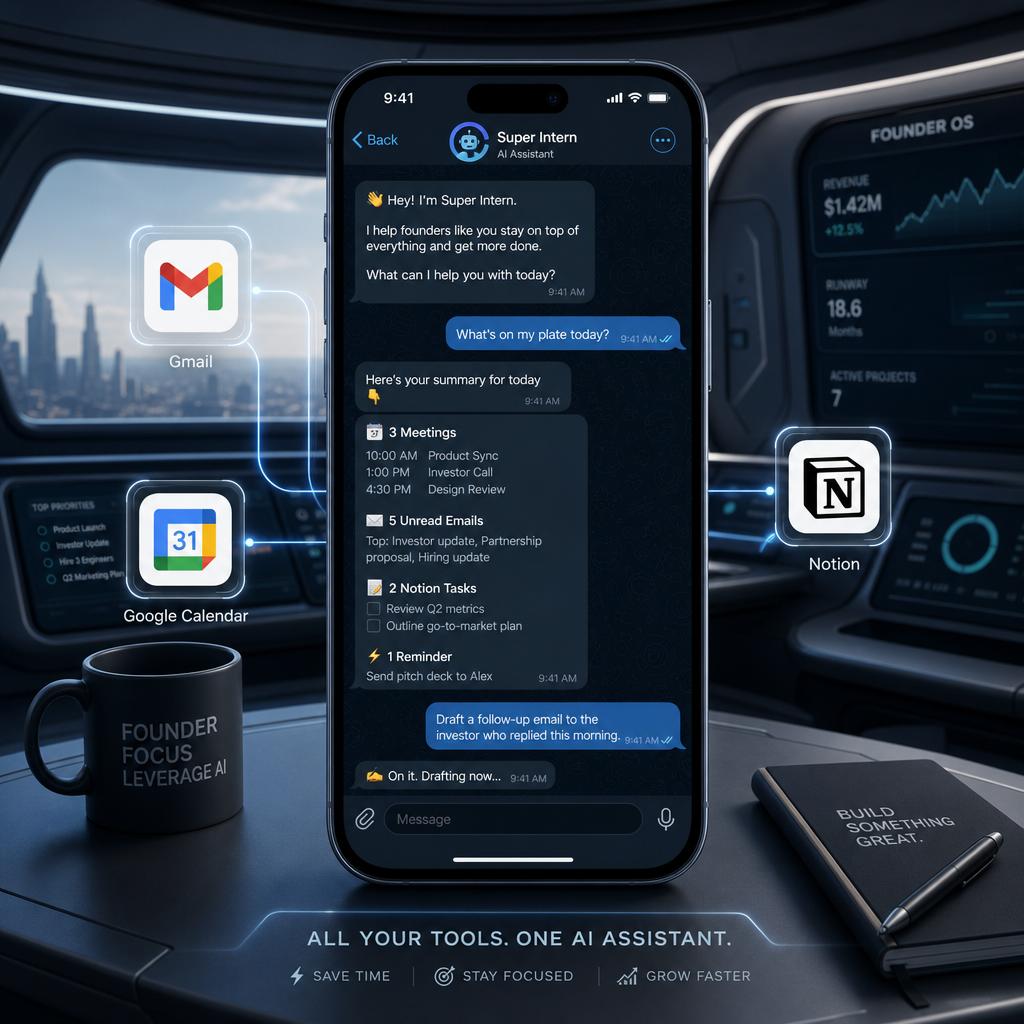
Transitioning from fragmented apps to a unified Telegram 'cockpit' is the ultimate move for any Corporation of One. This guide explores how to build an AI personal assistant that lives where you already chat.
Transitioning from fragmented apps to a unified Telegram "cockpit" is the ultimate move for any Corporation of One. This guide explores how to build an AI personal assistant that lives where you already chat, eliminating the need to jump between tabs.
In the current era of productivity, the average founder is drowning in "best-in-class" tools. You have a CRM for contacts, a calendar for meetings, Gmail for outreach, and Notion for documentation. While each tool is powerful in isolation, the cost of moving between them—what we call the "manual glue" phase—is eating 40% of your operational capacity.
You don't need another dashboard to log into. You need a cockpit.
Building a personal assistant inside Telegram isn't just about having a chatbot; it's about creating a unified command center for what we call a Corporation of One. By bridging your entire stack into a single messaging interface, you eliminate the friction of context-switching and reclaim your focus.
The Fragmentation Trap: Why Dashboards Are Failing You
Most SaaS tools are designed for the desktop era. They assume you have twenty tabs open and a dedicated thirty minutes to "do work." But for a modern founder or executive, work happens in the gaps—between meetings, in transit, or during a quick lunch.
Opening a dedicated mobile app to check a calendar conflict or draft a follow-up email is a multi-step ordeal. You have to find the app, wait for it to load, navigate the UI, and hope the data is in sync. This friction leads to a phenomenon called "Mobile Buffering": the tendency to park important ideas or tasks until you are back at a laptop because doing them on a phone is simply too tedious.
Telegram: The Only Cockpit for a "Corporation of One"
We chose Telegram as the primary interface for SuperIntern not because it’s a messaging app, but because it’s the most "bot-friendly" ecosystem on the planet. It allows for a level of operational depth that standalone web apps can't match.
This is more than just a chat window; it is a way to bridge your entire operational stack into a single, high-speed execution environment.
Expert Insights: David Huang on the Telegram Advantage
To understand why the future of work lives in messaging, we sat down with SuperIntern founder David Huang.
Q: What are the main advantages of using Telegram as the interface for an AI assistant compared to a standalone web app?
[Expert Answer Needed: David Huang] (Note to editor: Waiting for input on mobile buffering vs. app fragmentation.)
Q: How can a Telegram-based AI assistant help a 'Corporation of One' manage cross-platform tasks like email and scheduling simultaneously?
[Expert Answer Needed: David Huang] (Note to editor: Waiting for input on the 'manual glue' and background execution.)
As an AI operations partner, SuperIntern was designed specifically to kill the "operational tax" that plagues mobile users. David notes, "The heaviest tax is on mobile. Think about creating one meeting from your phone. You open Google Calendar, find the day, edit fields, jump to Gmail for names, jump back... that is a five-app, two-minute ordeal for a one-sentence task. SuperIntern lives where you already are."
How to Setup Your Telegram AI Assistant in 3 Steps
Transforming your Telegram into an AI cockpit takes less than two minutes:
1. Link Your Accounts
Search for @SuperInternBot on Telegram and send /start. Follow the OAuth prompts to link your SuperIntern account. This connects the "brain" to your messaging interface.
2. Connect Your Stack
In the SuperIntern web dashboard, authorize your primary data sources: Gmail, Google Calendar, Notion, and LinkedIn. Once connected, these are no longer separate apps—they are "capabilities" inside your Telegram chat.
3. Enable Ambient Mode
For a truly proactive experience, enable Ambient Mode in your private chat. This allows your intern to monitor your incoming messages (passively) and only speak up when it detects a commitment, a deadline, or a question it can answer autonomously.

From Chat to Action: Managing Your Entire Stack
The true power of a Telegram cockpit is the ability to manage cross-platform tasks simultaneously. You can send a single message that triggers actions in three different places:
- "Draft an email to Jessica regarding the PRD, create a task in Notion to review the wireframes by Wednesday, and find a 30-minute slot on my calendar for a follow-up."
Your assistant executes the Gmail draft, updates the Notion database, and checks your availability—all without you leaving the chat. This is the hallmark of a true AI operations partner.
Advanced Cockpit Features: Proactive Heartbeats
Unlike traditional bots that wait for a command, your Telegram cockpit is proactive. It uses "Heartbeats" to run background operations every few hours:
- Email Scan: Scans your Gmail, learns your writing style, and pre-drafts replies to important messages. You'll receive a Telegram notification when a draft is ready for your approval.
- Morning Briefing: At 6:00 AM, you receive a single Telegram message summarizing your weather, calendar conflicts, pending emails, and top-priority to-dos.
- Daily Wrap-up: At the end of the day, your assistant reflects on what was accomplished and updates your CRM or project management tools automatically.
FAQ
Q: Why choose Telegram over a dedicated SuperIntern mobile app? A: A dedicated app would be "one more tab" to check. By living in Telegram, we leverage an interface you already use 50+ times a day, eliminating the friction of "opening a tool" to get work done.
Q: Can I manage multiple platforms (like Discord and Slack) through Telegram? A: Yes. Your SuperIntern assistant shares context across all connected platforms. You can start a research task in Telegram and have the final summary posted to a specific Slack channel automatically.
Q: Is my data secure within the Telegram interface? /A: Absolutely. SuperIntern uses official APIs and encrypted tokens. Your messages are processed for task execution only and are never sold or used for general model training.
Q: How do I start a task via voice note? A: Simply record a voice note in the Telegram chat and send it. Your assistant will transcribe it, ask for clarification if needed, and execute the task exactly as if you had typed it.
Conclusion: Stop Being the Glue
The "Corporation of One" model isn't about working harder; it's about building systems that scale your presence. By turning Telegram into your AI operations cockpit, you stop acting as the manual glue between apps and start acting as the executive.
Ready to reclaim 40% of your week? Link your Telegram to SuperIntern today and start delegating.